What data to share with Paramark and how?
Last updated: October 1, 2026
You're getting ready to share data with Paramark and you want to know:
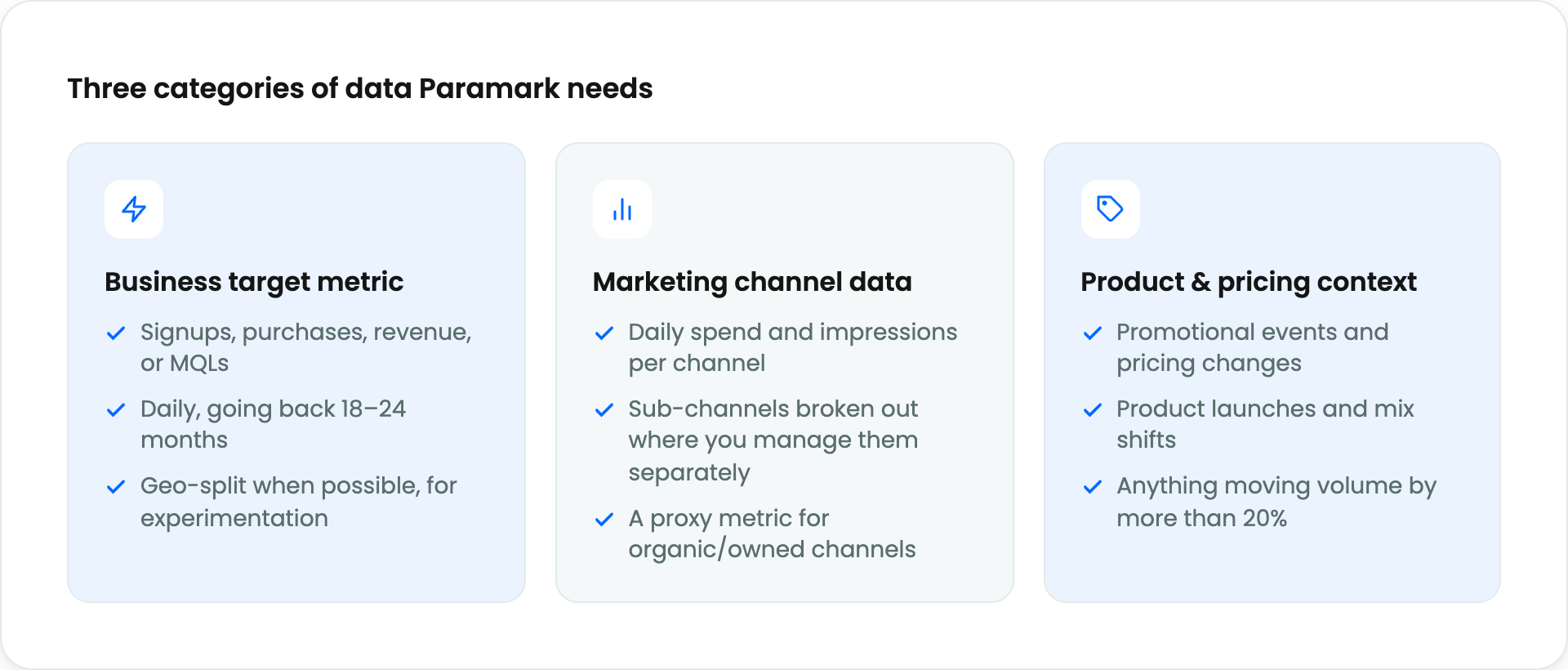
What exactly do you need to send?
How should it be structured?
What's the best way to get it to us?
This article walks through all three. It's designed to be the single starting point for anyone on your team (marketing, analytics, data engineering) who needs to understand the scope of the Paramark data handoff before doing anything else. It covers the three categories of data we need, the formatting best practices that keep things moving, and the three ways you can share data with us, in order of preference.
The short version: we need three categories of data, your data never needs to contain any personal information, and we'll meet your data where it already lives.
How to structure your data
Before getting into sharing methods, a few structural principles apply across everything you share.
Privacy by design

Schema design
We'll work with you to design a custom schema for your specific business, but we have a set of generalized schemas that cover the most common shapes of marketing data. Your Growth Advisor will share these with you and walk through which ones apply to which data sources. The common shapes include:
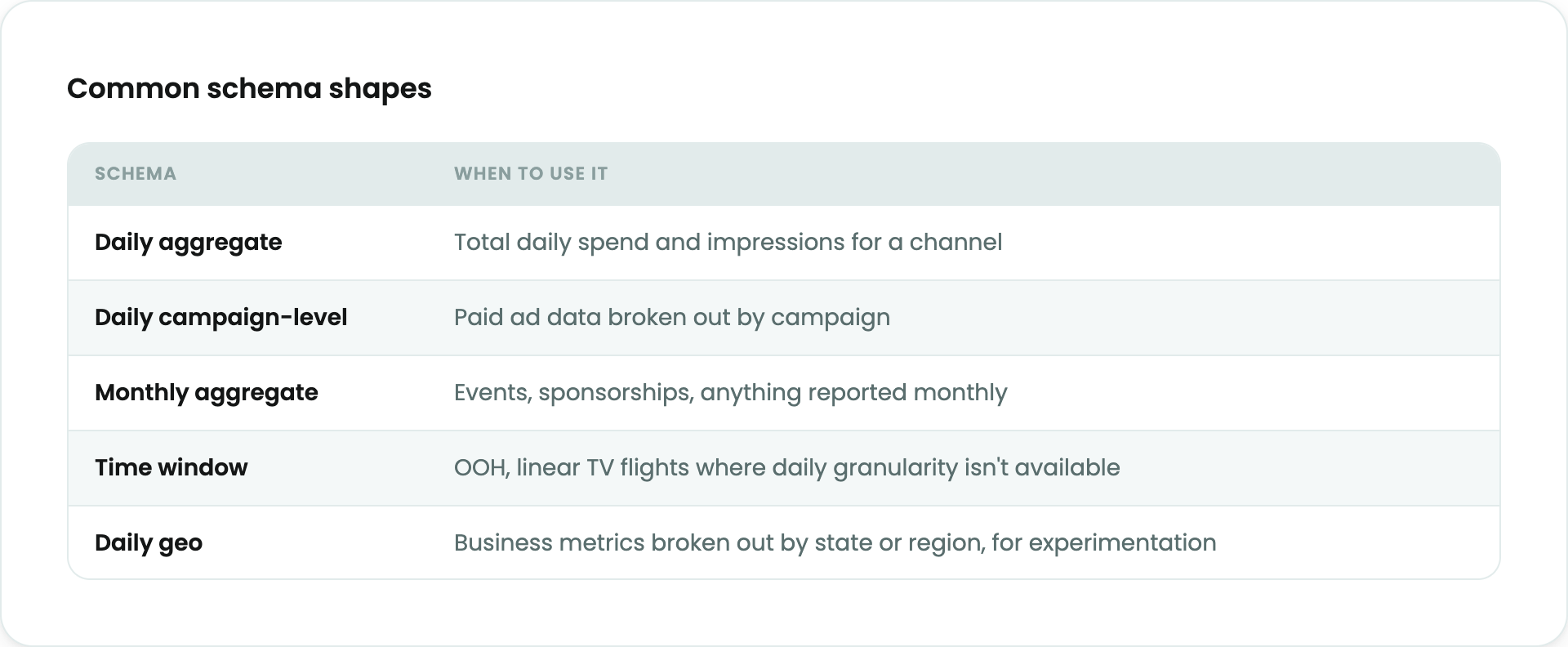
You don't need to memorize these. You do need to know roughly which shape each of your data sources has, so that when we review together, the conversation is concrete.
General formatting rules
A few rules apply to every file or table you share, regardless of source. Following these up front saves you days of back-and-forth later.
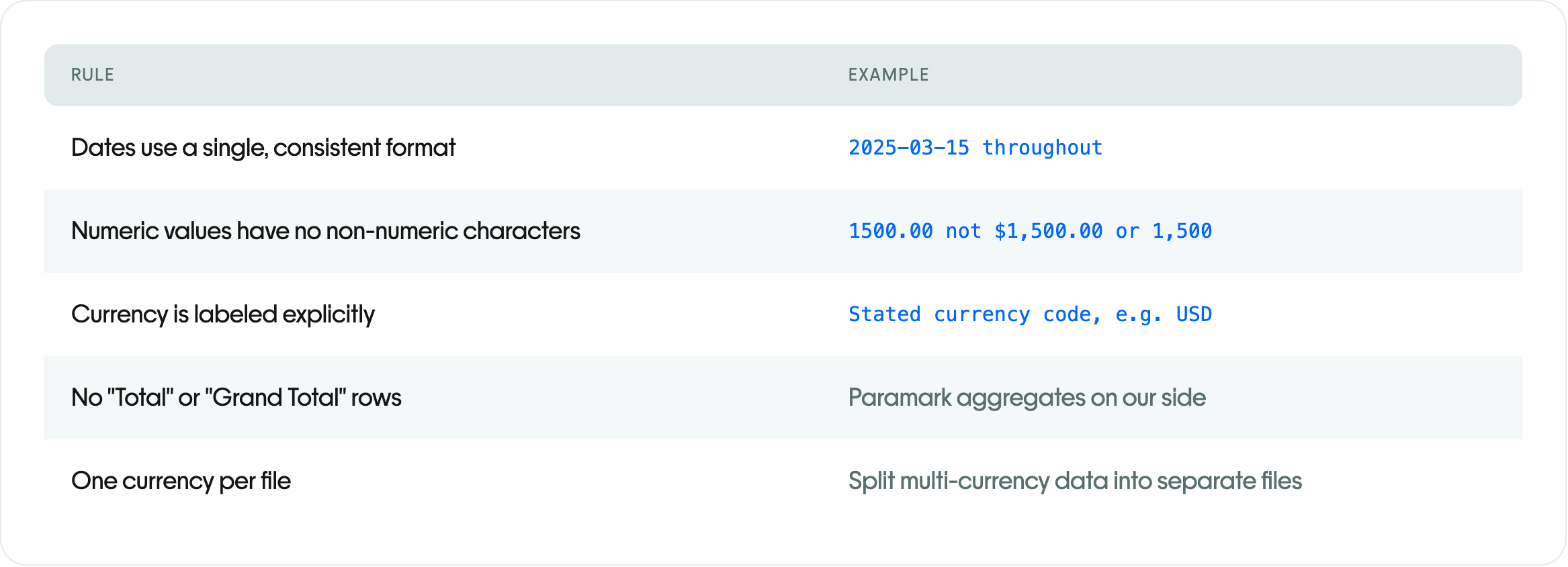
If you're exporting data from a BI tool or dashboard, export the underlying data, not the visual view. Merged cells, pivoted headers, and in-cell formulas all cause parsing issues downstream.
Where your data lives: the three sharing paths
Paramark will meet your data where it already is. We support three paths, listed here in order of preference. Your Growth Advisor will help you pick the right mix, since most customers end up using two of the three.
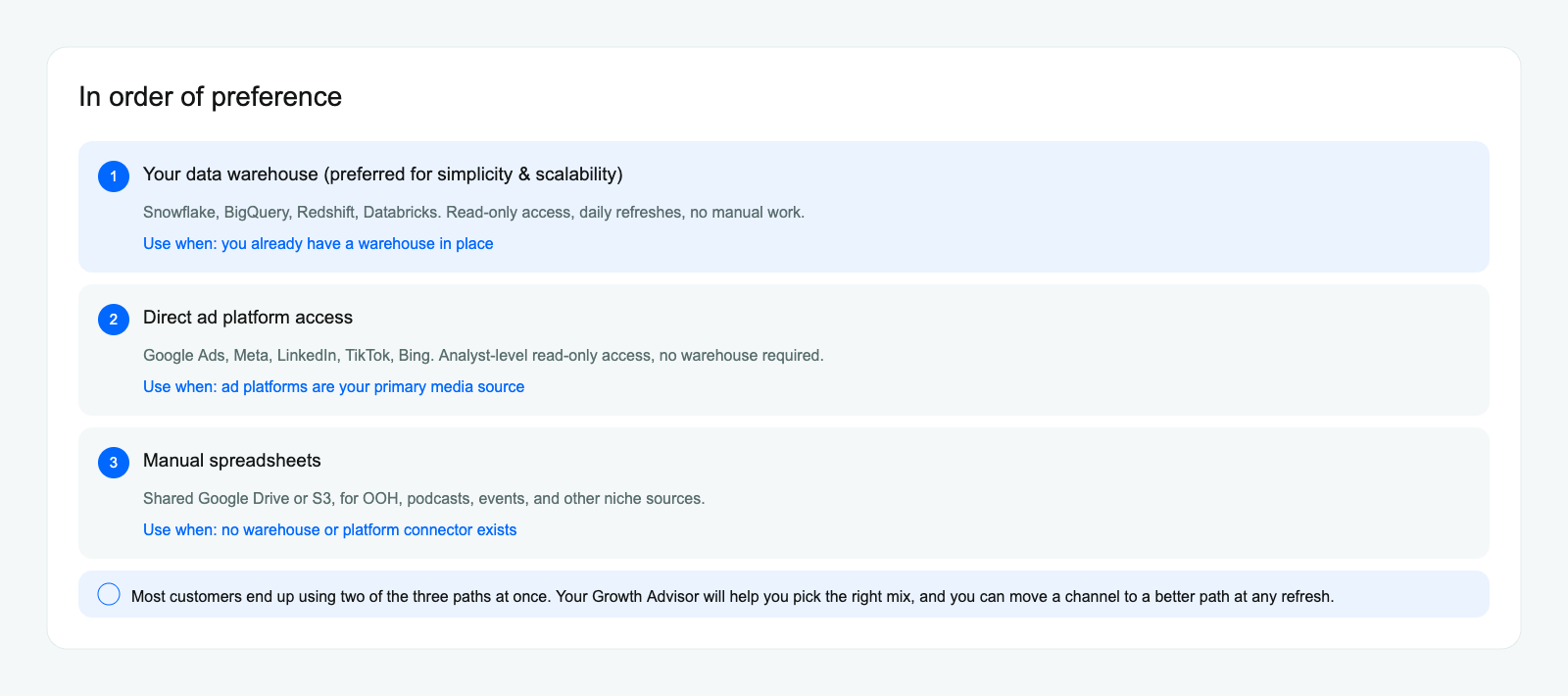
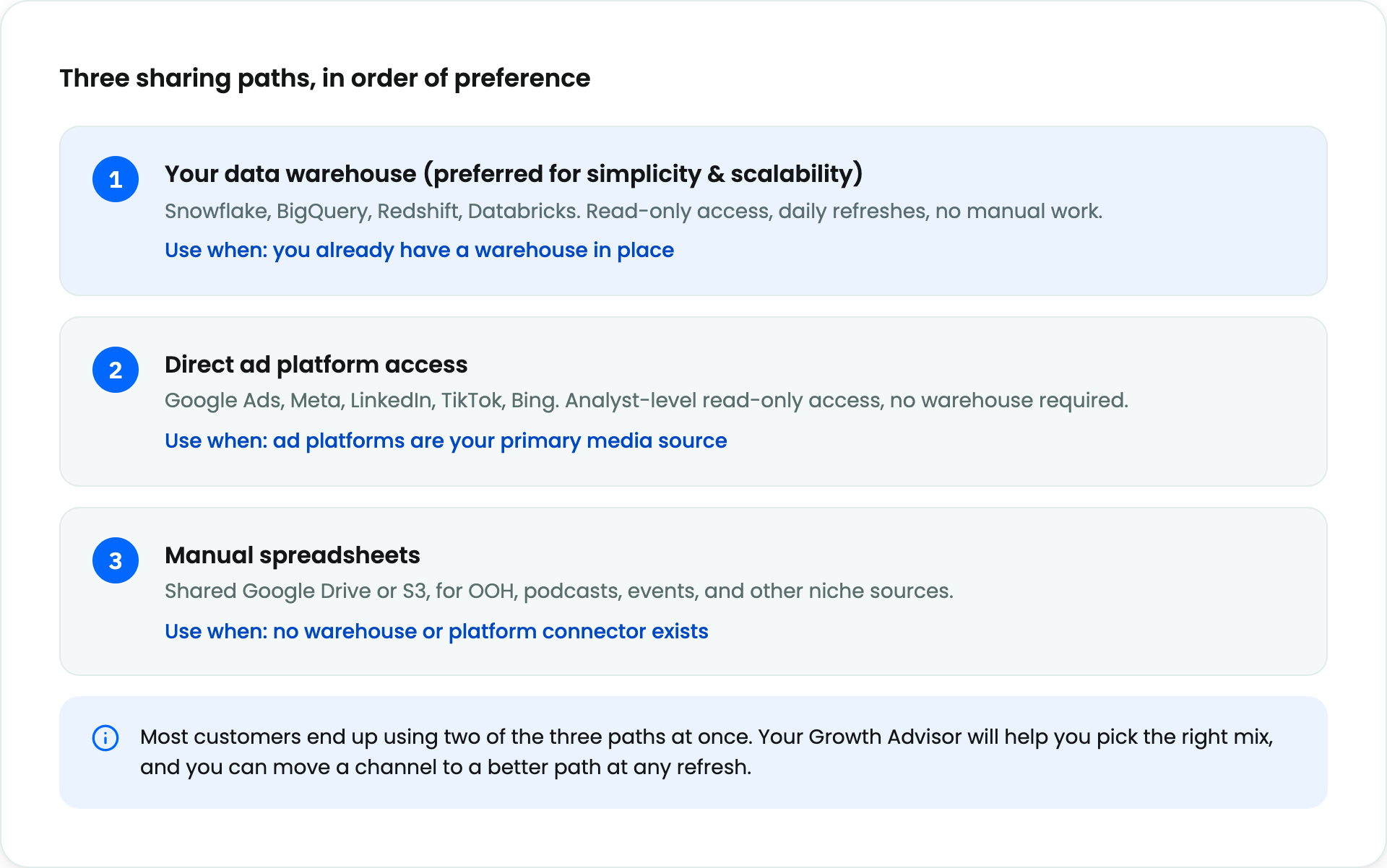
Warehouse data detailed setup instructions are in our warehouses guide.
Ad Platform sharing instructions are in our ad platform sharing guide. If you're using a platform we don't list, tell us and we'll work together on a solution.
Manual Data Guidelines
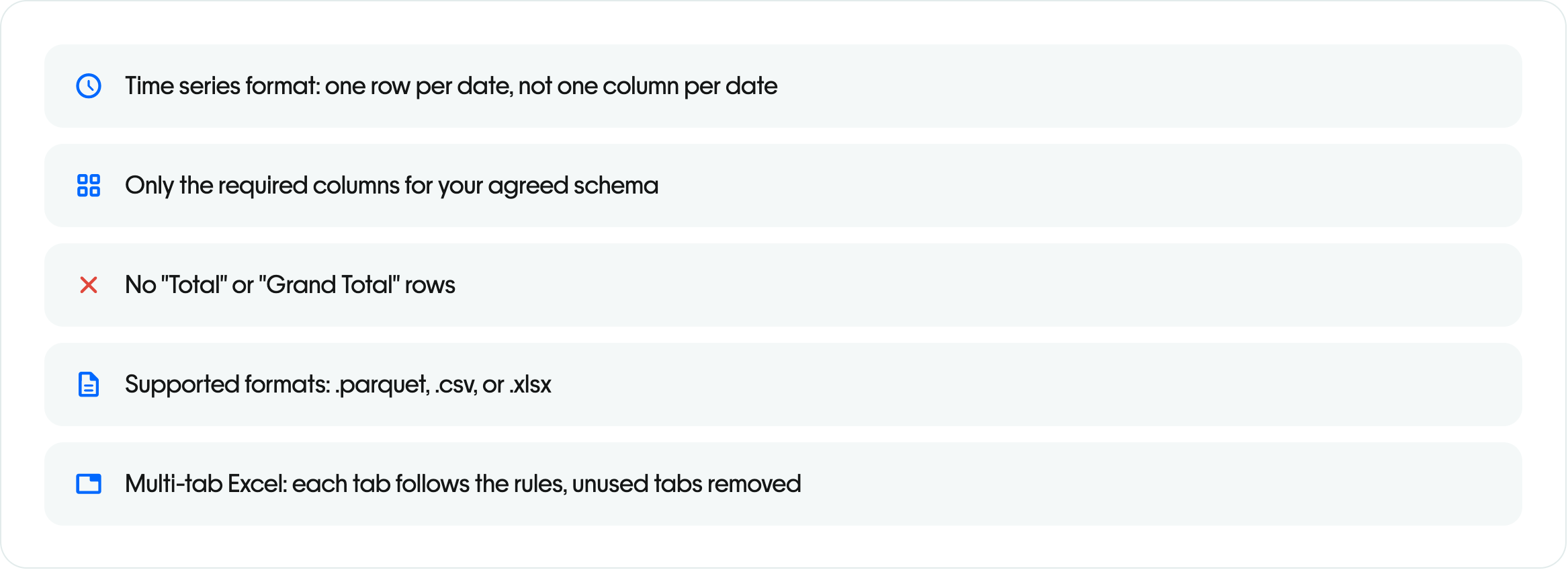
Manual data sharing guidance is in our manual data sharing guide and schema examples are in our Schema Examples article.
Putting it together
A realistic setup for a typical customer might look like this:
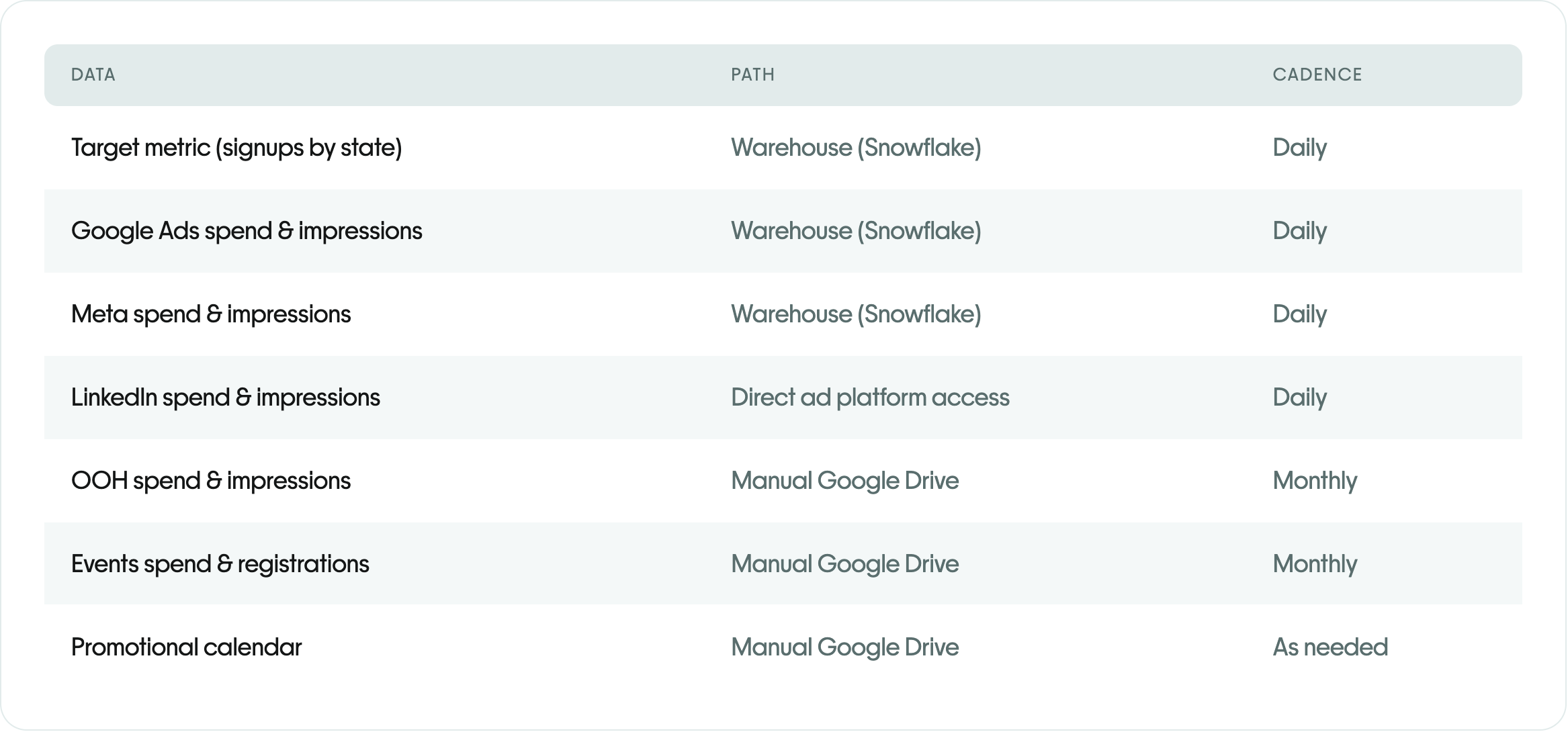
You don't need to get to this setup on day one. Most customers start with warehouse sharing for the highest-volume channels, add ad platform connectors for the rest of paid media, and set up manual sharing for the remaining offline channels over the first few weeks.
What happens next
Your Growth Advisor will also set up a short series of working sessions during data onboarding: an initial data review to confirm we can see what you sent, a full data review to validate the data quality with our Solutions Engineering team, and a readout to align on the plan for your first MMM.
Common questions
What do you mean by “daily” data?
When Paramark asks for daily data, there are usually two separate questions to clarify:
Data granularity (the grain of the table): do you mean the data should be structured at a day-level grain, such as one row per channel per day or one row per channel, geography, and day?
Delivery cadence (how often the data is refreshed): how often will new data be pushed to Paramark after the historical backfill is in place — for example, daily, weekly, or monthly?
Those are related but not the same. A dataset can be daily in structure even if it is only delivered weekly or monthly. In most onboarding cases, the most important requirement is that the shared data keeps a daily row structure so Paramark can model changes over time correctly. Refresh timing can then be agreed separately based on your team's workflow.
If you are unsure, confirm both items explicitly with your Growth Advisor before finalizing the share:
the row grain expected for each table
the refresh schedule your team can support
How much historical data do you need?
Ideally 18 to 24 months. 12 months works but produces a less stable model, especially around seasonality. Less than 12 months, and MMM becomes unreliable; your Growth Advisor will likely recommend starting with experimentation instead and building toward MMM as history accumulates.
As a practical example, if you are onboarding in the second half of a year, a backfill that reaches into the prior calendar year is usually still useful because it helps capture seasonality and gives Paramark more context for trend changes over time.
What if we can only share weekly or monthly historical data?
That can still be useful for directional analysis or early planning, but daily data is strongly preferred for MMM and for most experimentation-related work. Weekly data is generally more workable than monthly data because it preserves more time variation. Monthly summaries can be too coarse for reliable modeling, especially when campaign activity changes within the month.
If your systems only provide weekly or monthly exports today, send what you have and explain:
whether the data is structured by week or by month
how far back the history goes
whether a day-level backfill may become available later
which metrics are summaries versus true daily observations rolled up afterward
Your Growth Advisor can then tell you whether the current history is enough to begin, whether it supports only a subset of use cases, or whether a deeper or more granular backfill is needed first.
What if we only have an export from Amazon or another ad platform?
That is fine for a manual handoff as long as the file is normalized into a clean daily table before you send it. In practice, that means one row per day (or one row per day and geography if your engagement requires geo-level measurement), with numeric values stored as numbers rather than formatted text.
Include the date in a consistent YYYY-MM-DD style or another clearly parseable day-level format.
Remove spreadsheet formatting from metric fields such as dollar signs, commas, and other display characters so spend loads as a true numeric column.
Share spend and the platform’s delivery metric when available — usually impressions, but a proxy metric may work if that is the best export the platform supports.
If the export is account-level only, say that clearly. If geo-level experimentation is planned, also confirm whether geography can be added later.
If you are unsure whether the file is ready, send the sample anyway and call out what is missing. Paramark can usually confirm quickly whether the export is usable as-is or needs one more round of cleanup.
What if we're still waiting on a few important pieces like Meta impressions or inbound call counts?
That is common, and those are exactly the kinds of inputs that can determine whether onboarding moves cleanly into a first MMM or experiment design.
Channel input data like Meta impressions helps Paramark measure the scale of media exposure over time. If a paid channel is missing its core delivery signal, we can sometimes start validating the rest of the dataset, but the model will not be ready for a trustworthy read on that channel until the missing input is included.
Business outcome data like inbound call counts can be part of the target metric layer if calls are a meaningful conversion event for your business. If calls are the KPI itself, or an important component of the KPI, they should be shared with the same daily consistency as the rest of your outcome data.
If you plan to run experiments, geography-level outcome data matters even more. State, DMA, region, or similar breakdowns make it much easier for Paramark to design a credible test and choose the right primary metric.
The practical rule: if you already know a few inputs are still outstanding, send everything else now, but flag the missing pieces explicitly in your data catalog or to your Growth Advisor. That lets Paramark validate what is already in hand, identify whether the gaps are blockers for MMM, experimentation, or both, and tell you exactly what needs to land next.
Can we start with just a few channels and add more later?
You can, but it has trade-offs. A model built on a subset of channels will misattribute impact for the missing ones. It's better to include every channel you can from the start, even if the data is imperfect. Channels can be added later at any refresh, but that refresh will shift attribution as the model reconciles.
Do we really need product and pricing data? Our business is pretty simple
If your business truly doesn't run promotions, change pricing, or launch new products, you can skip this category. In practice, very few businesses are in that state. A 5-minute conversation with your Growth Advisor will confirm whether you need to share this.
What if our data team doesn't have time to support warehouse sharing right now?
Start with ad platform access and manual sharing for what you can. Put warehouse sharing on the roadmap for the next refresh cycle. A partial start with a plan to improve is better than waiting three months for the perfect handshake.
Can we start with Google Ads and GA4 while our warehouse tables are still being shared?
Yes. That is a common onboarding path. If your warehouse share is still being provisioned, Paramark can usually begin the Google Ads and GA4 access steps in parallel so the team can keep data onboarding and early experiment planning moving.
Warehouse setup and platform access do not need to finish on the same day. Your team can keep working on the warehouse handoff while also approving Google Ads linking requests and granting GA4 access.
The key milestone is clarity on what is still blocked. If Paramark can already read the shared test table, the most helpful next update is usually when the production analytics tables will be shared through and who owns that step internally.
Parallel access helps the first experiment move faster. Once Google Ads and GA4 are connected, Paramark can use the upcoming working session to align on the first priority channel, the primary measurement approach, and what additional geography-level delivery data may still be needed for the test.
If a geo incrementality test is planned on Google channels, be ready to confirm the first channel to test and whether daily geo-level delivery exports will be needed alongside the standard account connection.
In practice, this means you do not need to wait for every warehouse dependency to be fully complete before starting the Google-side access work. The fastest path is usually to keep both tracks moving in parallel, then use the next meeting to lock the remaining data handoff details and the first test plan.
What if we share something and it's wrong?
We'll catch most issues in the initial data review session. You can always update or replace what you've shared. The catalog document is designed to be a living record, not a one-time deliverable.
What if different retailers report sales differently — for example, one feed is shipment-based while others are retail sell-through?
That is common in CPG and retail-heavy datasets. Paramark can usually work with a mixed starting point, but the important thing is to label the difference clearly rather than letting it stay implicit.
Call out which retailers or channels are shipment-based versus retail-based. Those two views of sales can behave differently in timing and should not be treated as interchangeable without explanation.
Keep the grain and naming consistent wherever you can. If the rest of your business is being shared weekly by product, segment, and channel, try to keep the outlier feeds aligned to that same structure so review is faster.
Flag known caveats in the data catalog or to your Growth Advisor. Examples include retailer-specific definitions, delayed shipment recognition, or a feed that covers only part of the business.
Share the full historical file even if some retailers are imperfect. Paramark can often start validation and identify where the differences are material versus where they are just documentation issues.
The practical rule: mixed sales definitions are manageable if they are explicit. The slowest path is when a shipment-based series looks like retail sell-through in the file and only gets clarified later.
What if some channels are still being updated manually today and we want to automate them later?
That is common, especially early in onboarding. The best next step is usually a short working session to review each manual channel one by one and decide whether it can move to a more automated handoff through platform access, a read-only share, or an API key.
A practical review usually looks like this:
list each manual channel and confirm who owns the export today
check whether the source supports direct access, a recurring scheduled report, or dedicated API credentials
use the lowest-friction secure path that still gives Paramark consistent refreshes, which is often view-only access or a read-only API key
if the exports originate with a finance, analytics, or agency team, include that owner in the review so the long-term handoff is realistic
keep manual sharing in place temporarily for any channel that cannot be automated yet, but document the refresh cadence and owner so the gap stays visible
The reason to do this channel by channel is simple: the channels that are still handled by hand are often the ones most likely to drift, arrive late, or refresh inconsistently in Live. Moving even a few of them to a more automated setup usually improves data accuracy at the source and makes MMM refreshes more reliable.
What if one channel — like TV — is not available in our warehouse yet?
That is common. You do not need every channel to arrive through the same path on day one. Many teams share most of their data through a warehouse or ad-platform connection, then fill in a missing channel with a manual export while the longer-term setup is still being worked out.
For example, if your TV data currently lives in a platform like iSpot and is not being piped into Snowflake yet, the practical next step is usually to export the needed TV data directly from that platform's UI and share it with Paramark using the same schema and naming conventions you use for your other channel data.
Keep the manual export at the same grain and column structure you plan to use longer term whenever possible.
Use stable channel names and campaign labels so the temporary export can be reconciled with the rest of your data.
If the data will only be refreshed monthly for now, tell your Growth Advisor that refresh cadence explicitly so model or reporting expectations can be set correctly.
Once the warehouse pipeline is ready, Paramark can transition that channel from manual sharing to the more automated path.
The practical rule: a temporary manual export is usually better than waiting to share the channel until the perfect pipeline exists, as long as the structure is clear and the refresh cadence is understood.
What if a column or field is missing from a connector table even though the table itself is syncing?
That usually points to an upstream data-population issue rather than a Paramark ingestion problem. Some connectors and sync tools omit empty columns or leave a field effectively unusable when the source system is returning blank values for every record.
A practical checklist is:
confirm whether the source system actually has non-empty values for that field in recent records
check whether the connector or sync method supports empty tables and empty columns
if every source value is blank, treat the missing column as expected until populated data exists upstream
if the field should contain data, provide a few example records with real values so the connector behavior can be re-tested quickly
The practical rule: before debugging Paramark, first verify whether the upstream platform is returning any real values for the missing field. If the source records are blank, the next fix usually belongs in the source system or connector configuration rather than in downstream modeling.
Do we need an NDA before sharing data with Paramark?
Usually, yes if your company requires one for vendor or data access review, and that is completely normal. Many teams prefer to have an NDA in place before sharing warehouse access, exports, or other business data.
The practical sequence is:
send the NDA through your normal legal or procurement process
once it is signed, work with your Growth Advisor on the data-sharing path that fits your systems
if useful, Paramark can start with a feasibility review of the data you plan to share once the paperwork is complete
If legal review is still in progress, that usually does not block planning conversations about schema, required fields, or which systems will be involved. It mainly affects when the actual data handoff should begin.
We finished the NDA and already shared file-format guidance. What should happen next?
That is a normal handoff point. Once the NDA is complete and your team has shared any formatting guidance or sample file structure, the next step is usually a feasibility review of the planned data share.
Confirm which files, tables, or connectors will be included first.
Call out any formatting rules your team already follows so Paramark can validate them against the expected schema and grain.
Send the first sample, export, or warehouse share as soon as it is ready rather than waiting for every source to be perfect.
Use the follow-up review to confirm whether anything else is needed before full onboarding continues.
In practice, this stage is less about legal paperwork and more about making the first real data handoff concrete enough for Paramark to confirm structure, identify any gaps, and keep onboarding moving.
Can we share aggregated, non-PII data for MMM if we are not ready to send user-level data?
Yes. In most MMM onboarding workflows, aggregated time-series data is exactly what Paramark needs, and it does not need to include personal information. A practical starting point is a daily table with the core business outcome metrics and a separate daily table for marketing inputs such as spend, impressions, or other delivery metrics.
Keep the data aggregated at the grain Paramark will model — for example by day, channel, campaign group, geography, or another agreed reporting level.
Do not include row-level customer records or PII unless Paramark explicitly asks for a specialized use case. For standard MMM onboarding, customer-level identifiers are usually unnecessary.
If some channels only exist as manual exports, that is still workable. Use the same naming, date format, and metric definitions as the rest of your shared data so those inputs can be reconciled cleanly.
If you are choosing between a more detailed but messy export and a cleaner aggregated table, start with the cleaner aggregated version. Paramark can tell you quickly whether the grain is sufficient or whether a deeper breakdown would materially improve the model.
The practical rule: aggregated, non-PII data is usually the right default for MMM onboarding. The most important thing is not individual-level detail; it is having a consistent time series, clear metric definitions, and enough historical coverage for Paramark to validate and model the data.
We shared our target metric schema and marketing data inventory. What should happen next?
That is usually the point where Paramark can move from planning into concrete onboarding review. Once your team has shared the target metric definitions and a source-by-source inventory of the data you expect to provide, the next step is to validate what is already available and identify what still needs to be added before modeling begins.
Confirm which required sources are already ready to share. If most of the requested data is already available in the agreed format, send those sources first rather than waiting for every remaining input to be perfect.
Flag the remaining gaps explicitly. Call out any channels, outcome metrics, or dimensions that are still missing, still being reformatted, or still under internal review so Paramark can tell you which gaps are blockers versus follow-up items.
Use the inventory as the working checklist. The inventory should make it clear what each file or table contains, where it comes from, who owns it, and what format Paramark should expect.
Expect a follow-up working session. Paramark will typically use the next review to confirm the schema, validate sample data, and align on what needs to land next before the first MMM or experiment workstream moves forward.
The practical rule: once the schema and inventory are in place, progress comes from sharing the ready data now and making the remaining gaps visible, not from waiting until every source is complete.
We signed the DPA and already shared our data spreadsheet. What happens next?
That is a normal onboarding milestone. Once the DPA is complete and your team has already shared the spreadsheet or sample data, the next step is usually for Paramark to review what was sent and confirm whether anything else is needed to move into full data onboarding.
Make sure the shared file clearly labels each data source. If multiple tabs or files are included, note what each one represents and who owns it internally.
Call out any known gaps up front. If some channels, outcome metrics, or dimensions are still missing, flag them explicitly so Paramark can tell you whether they are blockers or can follow later.
Expect an initial feasibility or data review. Paramark will usually confirm whether the spreadsheet structure is usable as-is, whether any reformatting is needed, and what the next working session should cover.
Keep onboarding moving with the data that is already ready. You do not need to wait for every source to be perfect before Paramark starts validating what is already in hand.
The practical rule: once the DPA is signed and the first spreadsheet is shared, progress comes from reviewing the real data quickly, making any missing pieces explicit, and using that review to plan the next onboarding steps.
How do we know a shared spreadsheet or Google Drive request is really from Paramark?
If you are sharing files manually, only grant access to the Paramark contact you already know or to an address on the @paramark.com domain that your team has already confirmed through an existing email thread, kickoff note, or live conversation.
Do not rely only on the document title or invitation language. A file called “Paramark” or “data catalog” is not proof that the request is legitimate.
If a new sender asks for access, verify them out of band first. Reply in your existing thread with your Growth Advisor or ask your known Paramark contact to confirm the request before sharing anything.
Use the least-permissive access that still works. If edit access is not required yet, start with view-only access until your team confirms the handoff details.
When in doubt, pause and ask. Paramark would rather confirm the correct recipient than have your team share business data with the wrong person.
The practical rule: if a spreadsheet share request looks unexpected, comes from an unfamiliar address, or does not match the people already working with you, confirm it before granting access.
Can Paramark see our data after engagement ends?
No. Warehouse shares can be revoked by you at any time. Ad platform access can be removed. Shared folders can be archived. Your data stays under your control throughout.
Want to learn more?
A few other articles that often help at this stage:
If you hit a question that isn't covered here, your Growth Advisor is your best resource. Data onboarding is the phase where a 20-minute call saves a week of back-and-forth. Use them.